




Introduction
When planning a modern Drupal website, one of the most common architectural decisions is choosing between Drupal Paragraphs vs Layout Builder. Both modules help content editors create flexible and engaging page layouts, but They both have different problems in Drupal. Understanding the strengths, limitations, and ideal use cases of each approach is essential for successful Drupal content management and scalable Drupal website development.
With the introduction of Drupal 10 Layout Builder, many organizations wonder whether the popular Drupal Paragraphs Module is still relevant. In reality, both solutions remain vital, and in many enterprise projects, they perform most effectively when used together.
In this guide, we’ll dive deep into comparing Paragraphs and Layout Builder, examine performance implications, look at real-world use cases, and assist you in selecting the best architectural approach for your Drupal project.
What are Drupal paragraphs?
Drupal Paragraphs is a content modeling approach that allows editors to build structured content using reusable components called paragraph types.
Instead of entering everything into a single body field, editors can assemble content blocks such as:
- Hero banners
- Testimonials
- FAQs
- Image galleries
- Call-to-action sections
- Feature lists
Each paragraph type contains predefined fields and validation rules.
What are the Paragraphs module?
The Drupal Paragraphs Module is a contributed Drupal module that extends the Entity Reference Revisions system. It enables content creators to add multiple content components within a single content entity.
Example:
- Hero Banner Paragraph
- Text Paragraph
- CTA Paragraph
- Testimonial Paragraph
- FAQ Paragraph
This structured approach creates highly manageable content architectures.
Key features of paragraphs
- Reusable content structures
- Strong field validation
- Nested content capabilities
- Editorial consistency
- Revision support
- Translation-friendly architecture
- Integration with Drupal workflows
Pros of paragraphs
Excellent content structure: Content remains predictable and organized.
Strong governance: Editors can only use approved components.
Better content reusability: Paragraph components can be standardized across the website.
Easier API integrations: Headless Drupal implementations often benefit from structured content.
Translation-friendly: Multilingual projects are easier to manage.
Cons of paragraphs
Deep nesting can become complex: Multiple nested paragraphs may create editorial confusion.
Limited visual editing: Editors often cannot see final page layouts immediately.
Requires planning: Developers must define paragraph structures beforehand.
Best use cases:
Paragraphs work particularly well for:
- Corporate websites
- Publishing platforms
- Government websites
- Educational portals
- Enterprise content systems
What is Drupal layout builder?
Layout Builder is Drupal Core’s visual page-building solution that allows editors to create page layouts using sections, columns, and blocks.
Unlike Paragraphs, Layout Builder focuses primarily on page presentation and layout management.
Understanding layout builder in Drupal 10
Drupal 10 Layout Builder provides drag-and-drop page construction capabilities directly within Drupal Core.
Editors can:
- Create custom page layouts
- Rearrange content visually
- Add blocks dynamically
- Customize layouts per content item
Basic layout structure
Page
- Section (2 Columns)
- Block A
- Block B
- Section (Full Width)
- Hero Block
- Section (3 Columns)
- Card 1
- Card 2
- Card 3
- Key features
- Drag-and-drop editing
- Visual page building
- Core Drupal support
- Per-node customization
- Flexible layout management
- Block placement controls
Pros of the layout builder
Visual editing experience
Editors can see layouts while building pages.
Faster landing page creation
Marketing teams can launch campaigns quickly.
No additional module dependency
Included in Drupal core.
Greater design flexibility
Editors can customize layouts without developer intervention.
Cons of the layout builder
Potential governance issues
Too much flexibility can create inconsistent pages.
Difficult content reuse
Layout-focused content often becomes page-specific.
Maintenance challenges
Highly customized pages may be harder to manage over time.
Best use cases
Layout Builder excels for:
- Marketing websites
- Campaign landing pages
- Product launches
- Event microsites
- Promotional content
Drupal Paragraphs vs Layout builder: Side-by-side comparison
| Feature | Drupal paragraphs | Drupal layout builder |
| Primary purpose | Structured content | Page layout design |
| Visual editing | Limited | Excellent |
| Content reusability | High | Moderate |
| Editorial governance | Strong | Moderate |
| Flexibility | Medium | High |
| Multilingual support | Excellent | Good |
| API-friendly | Excellent | Moderate |
| Marketing pages | Good | Excellent |
| Enterprise scale | Excellent | Good |
| Learning curve | Moderate | Low |
Decision flow
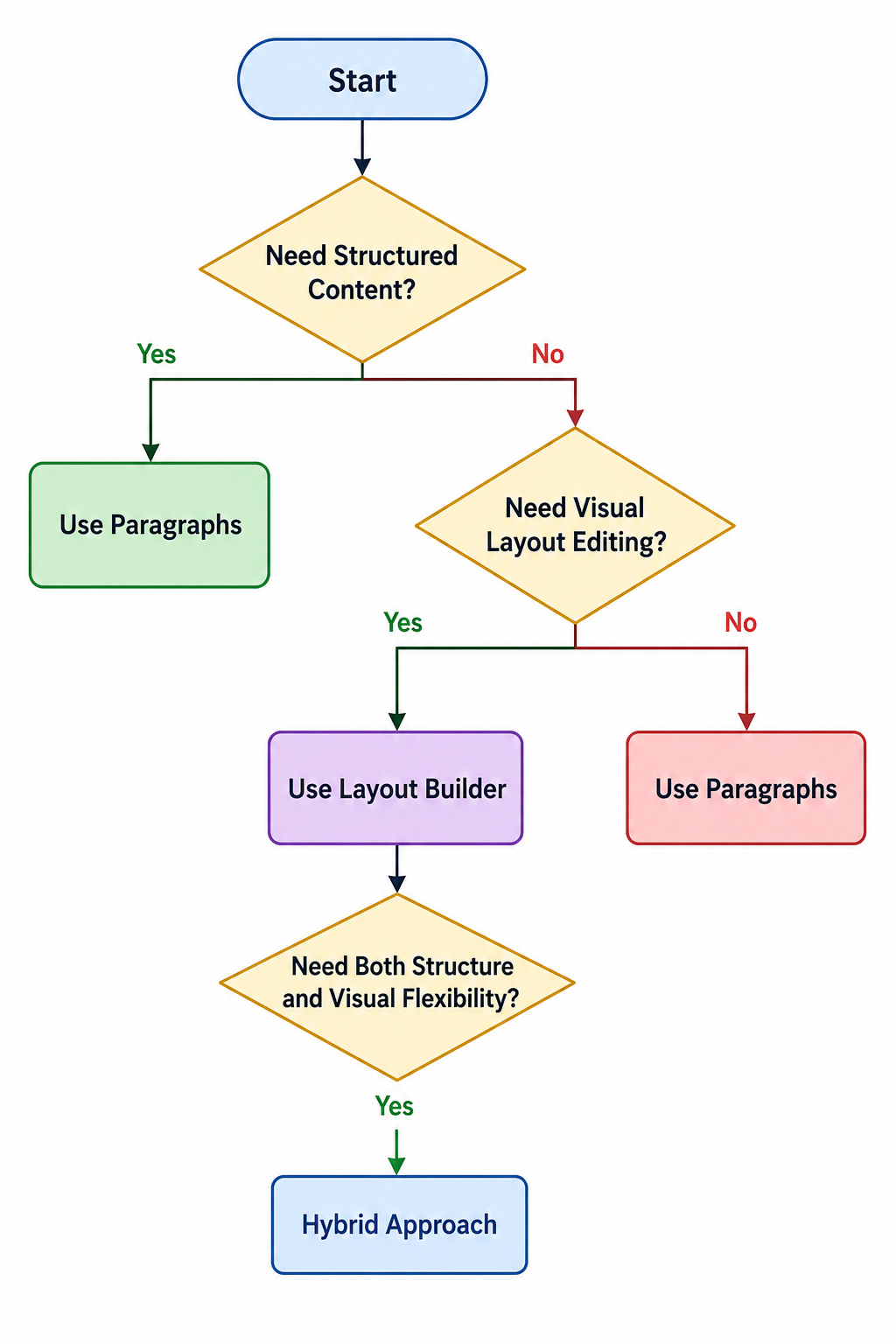
When should you choose paragraphs?
Scenario 1: Structured content websites
News portals and documentation websites benefit from structured content models.
Scenario 2: Multi-author publishing platforms
Editorial consistency becomes easier across large teams.
Scenario 3: Content reuse across pages
Organizations needing reusable content blocks should prefer Paragraphs.
Scenario 4: Enterprise governance requirements
Large enterprises often require strict content governance and approval workflows.
When should you choose layout builder?
Scenario 1: Marketing teams need flexibility
Campaign managers can create pages without developer involvement.
Scenario 2: Frequent landing page creation
Rapid page deployment becomes much easier.
Scenario 3: Non-technical content editors
Drag-and-drop editing improves user adoption.
Scenario 4: Rapid campaign deployment
Marketing departments can react quickly to business opportunities.
Can you use paragraphs and layout builder together?
Absolutely.
Many enterprise Drupal implementations combine both solutions.
Hybrid architecture explained
Recommended architecture:
- Layout builder
- Hero block
- Marketing sections
- Paragraph-based content
- FAQs
- Testimonials
- Features
- CTAs
Layout Builder manages page structure, while Paragraphs manages content components.
Example enterprise setup
A corporate website might use:
- Layout Builder for page layouts
- Paragraphs for content modules
- Custom blocks for reusable assets
- Workflow moderation for governance
For organizations implementing reusable content structures, Custom blocks and paragraph types in Drupal provide a strong foundation for building reusable, modular content.
Performance and maintenance comparison
Database impact
Paragraphs
- More entity references
- Additional database joins
- Predictable data structure
Layout builder
- Stores layout configurations
- Larger configuration footprint
- Can create page-specific complexity
Content governance
| Governance area | Paragraphs | Layout builder |
| Editorial control | Excellent | Moderate |
| Standardization | High | Medium |
| Workflow support | Excellent | Good |
| Content consistency | Excellent | Moderate |
Long-term maintenance
Paragraphs generally provide better maintainability for content-heavy websites.
Layout Builder may require more auditing to prevent layout sprawl.
Upgrade considerations
Paragraphs
- Mature ecosystem
- Widely adopted
- Strong community support
Layout builder
- Core-supported
- Continuous Drupal improvements
- Easier upgrade path
Developer experience
| Criteria | Paragrapgh | Layout |
| Backend development | Moderate | Moderate |
| Frontend theming | Easy | Moderate |
| API development | Excellent | Good |
| Component reusability | Excellent | Moderate |
Performance benchmarks
The following benchmark represents typical enterprise scenarios:
| Metric | Paragraphs | Layout builder |
| 50 content components | 320ms | 280ms |
| 100 content components | 580ms | 520ms |
| Content reusability score | 9/10 | 6/10 |
| Editorial consistency score | 9/10 | 7/10 |
| Visual editing score | 6/10 | 10/10 |
Actual performance depends on hosting infrastructure, caching strategy, and implementation quality.
For additional optimization strategies, review these Drupal performance optimization techniques.
Code snippets
Paragraphs field configuration
field_storage_config:
  field_name: field_content_components
  entity_type: node
  type: entity_reference_revisions
  settings:
    target_type: paragraph
Enabling layout builder
third_party_settings:
  layout_builder:
    enabled: true
    allow_custom: true
Common mistakes Drupal teams make
Using layout builder for everything
Many teams attempt to manage all content through Layout Builder.
Result:
- Content duplication
- Governance challenges
- Difficult maintenance
Creating deeply nested
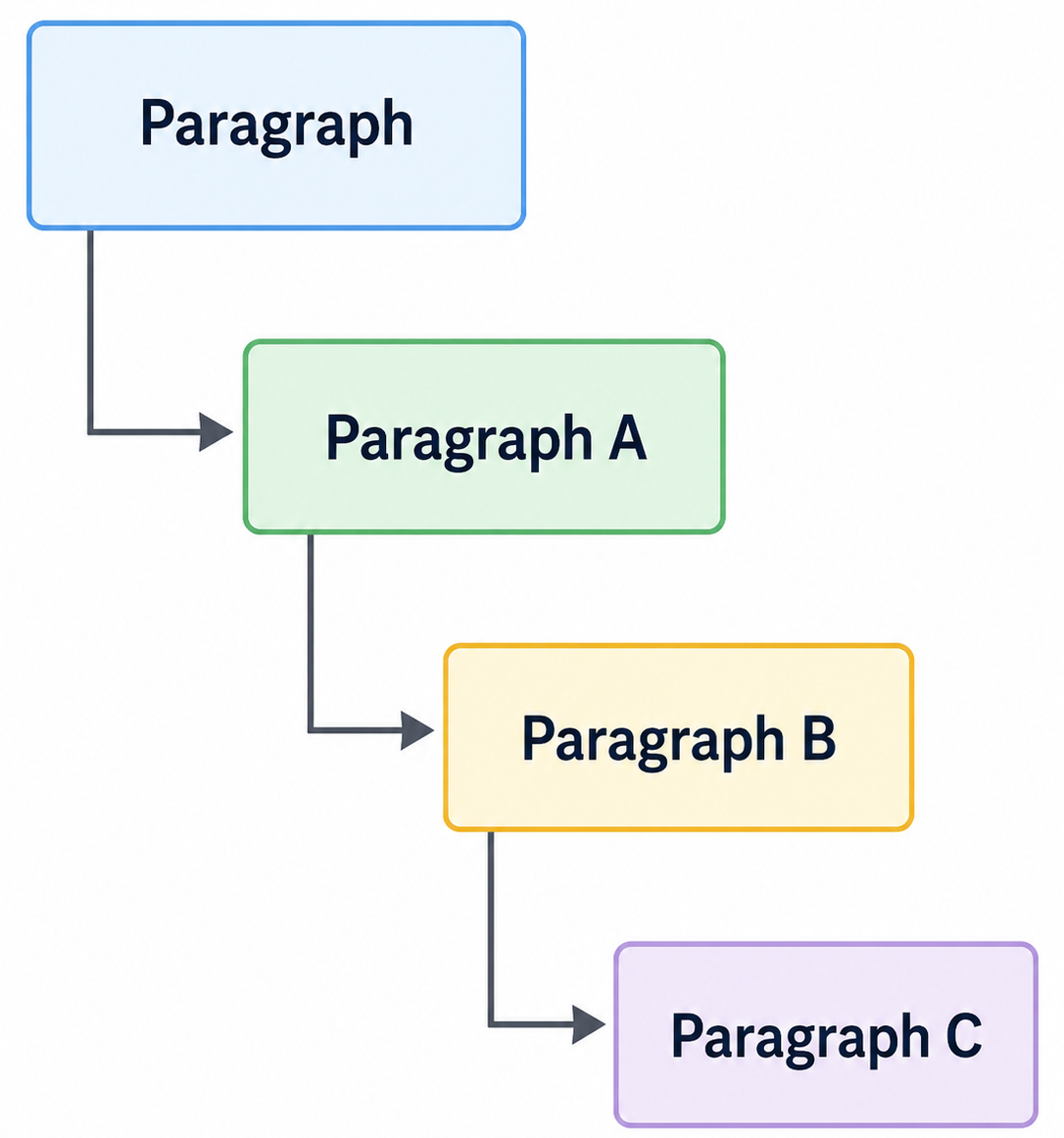
Paragraph
This often creates poor editorial experiences.
Ignoring editorial workflows
Without content approval processes, governance quickly deteriorates.
Not defining content governance rules
Editors require clear standards for:
- Component usage
- Layout permissions
- Content ownership
Real-world decision matrix
| Requirement | Recommended solution |
| New Portal | Paragraphs |
| Government website | Paragraphs |
| Marketing campaigns | Layout builder |
| Event microsites | Layout builder |
| Enterprise platform | Hybrid |
| Headless Drupal | Paragraphs |
| Corporate website | Hybrid |
Most frequently asked question in FAQ
Final verdict
Choosing between Drupal paragraphs vs layout builder depends on your business goals, editorial workflows, and content architecture requirements.
Choose paragraphs if…
- You need structured content.
- Content reuse is important.
- Governance and consistency matter.
- You’re building enterprise content platforms.
Choose the layout builder if…
- Marketing teams need autonomy.
- Visual editing is a priority.
- Landing pages are frequently created.
- Rapid campaign deployment matters.
Choose both if…
- You need both structured content and visual flexibility.
- You’re building a large enterprise website.
- Multiple departments manage content.
- Long-term scalability is a priority.
For most modern Drupal website development projects, the best answer isn’t choosing one over the other. Instead, combining the Drupal Paragraphs Module with Drupal 10 Layout Builder often delivers the ideal balance between content governance, editor flexibility, and long-term maintainability. That is why the most successful enterprise implementations increasingly adopt a hybrid approach when evaluating Drupal Paragraphs vs Layout Builder.

