




Introduction
REST APIs in WordPress tend to get slow for reasons that are pretty predictable: database queries that don’t get cached and end up running on every request, plugins that hook into rest_api_init and add extra overhead, plus JSON payloads that end up being way larger than what the client actually needs. The symptoms are easy to spot — a headless frontend that feels sluggish, a mobile app with long loading spinners, or a custom form that takes noticeably longer to submit than it should.
Once you understand why WordPress REST API responses are slow, caching becomes the highest-leverage fix you can make — often turning a 1,500ms response into something under 100ms. This guide kinda walks through how and why everything gets slow, which diagnostic tools to lean on, and pretty much every caching approach you can think of, from browser headers, to Redis, even stretching out to edge CDNs.
What causes slow WordPress REST API responses?
Before you reach for a caching plugin, it’s worth understanding where the delay is actually hiding, not just guessing around.
Common culprits include:
- Expensive database queries — WP_Query calls with multiple taxonomy or meta lookups, especially on large post tables without proper indexing.
- Multiple plugin hooks — every plugin that filters rest_prepare_post or adds fields to a response adds its own execution time, and these add up fast on a typical WordPress install with 20+ active plugins.
- Large JSON payloads — sending the whole post body, every meta thing, and also those nested _embed bits, even when the client really only wants a title and maybe a short excerpt.
- External API calls — those endpoints that go out to some third party service (payment gateways shipping calculators, geolocatioA decent baseline would be this: when a simple GET against /wp-json/wp/v2/posts is consistently triggering more than 15–20 database queries, or it’s slower than about 300–400ms TTFB on an uncached hit, then caching will very likely bring a very obvious improvement.n APIs) right in the middle, synchronously during the request.
- Authentication overhead — nonce verification, JWT validation, or OAuth token checks running on every single call, including public GET requests that don’t need them.
- WooCommerce endpoints — product, cart, and order, tend to be kinda heavy since they have to stitch together several tables and refigure totals each time you hit them, so yeah, every call can feel like work.
- Headless WordPress traffic — When WordPress is running a decoupled front end (Next.js, Gatsby, a mobile app), the REST API is basically the only door to your content, so every page view, each component, and even re-render cycles can end up causing a new fetch. If caching is missing, this kind of request rhythm multiplies server strain really fast, like it snowballs without asking.
How WordPress REST API requests work
Understanding the request lifecycle makes it obvious where caching layers can intercept the process and save time.
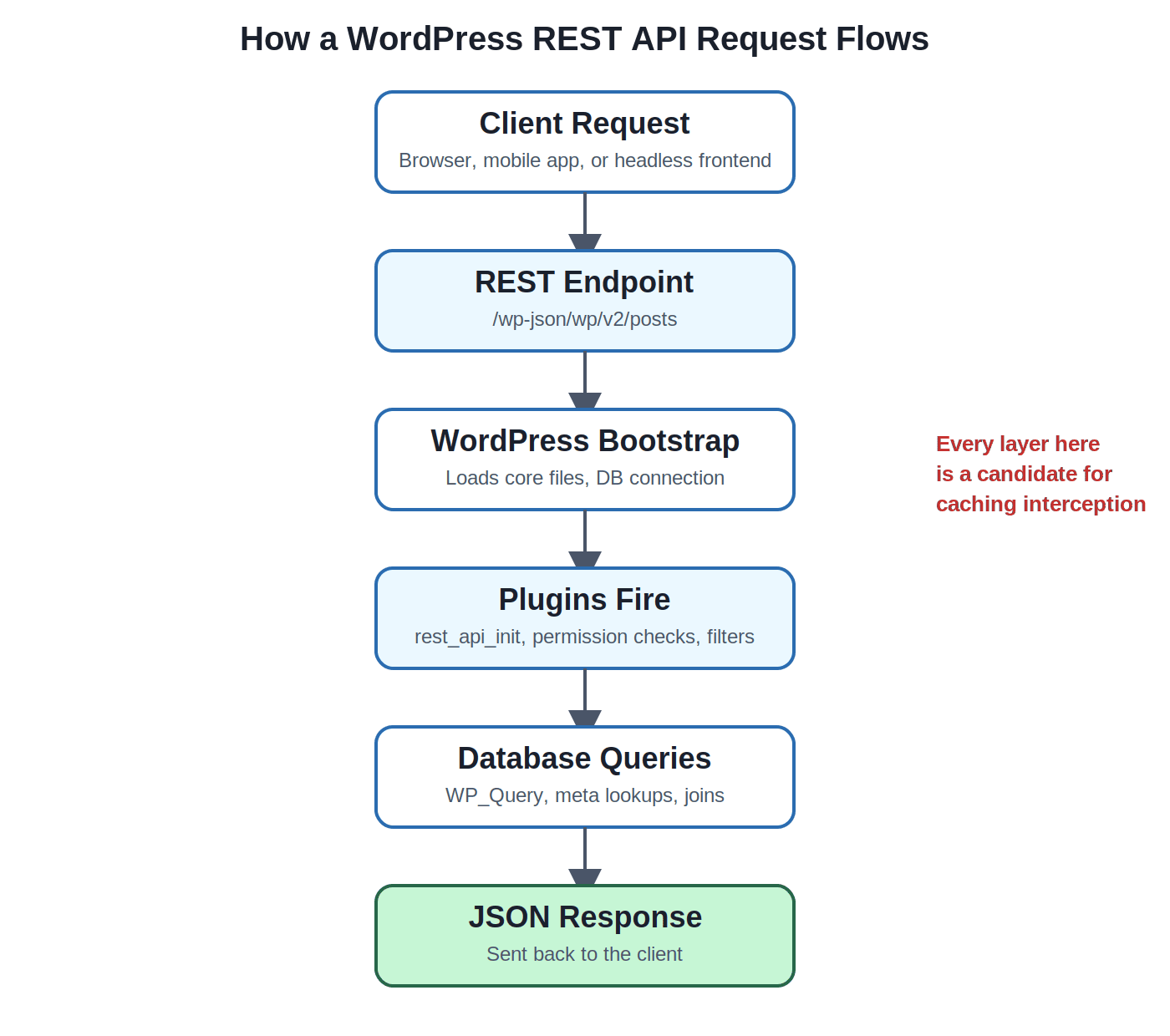
Every layer in this chain — Bootstrap, Plugins, Database — is a candidate for optimization. But the key insight is this: if a response doesn’t change between requests, there’s no reason to run this entire chain again. That’s exactly what caching prevents.
Measure before optimizing
It’s tempting to rush ahead and just install Redis, or slap on a caching plugin, but you really should measure first. If you start guessing where the slowdown is, you end up wasting time and sometimes it even makes things worse, like you know… you tune the wrong part, and suddenly everything feels “better” for a minute, then backfires.
Tools to profile your REST API:
| Tool | What it shows | Best for |
| Query monitor | Query count, query time, hooks fired, memory usage | Diagnosing plugin/database overhead |
| Chrome DevTools | TTFB, full response time, payload size | Client-side request timing |
| Postman | Raw endpoint response time, headers, status codes | Testing endpoints in isolation |
| Lighthouse | Overall page performance impact of API calls | Headless/frontend performance audits |
| New relic | Server-side transaction traces, slow query detection | Production monitoring at scale |
Key metrics to track:
- TTFB (Time to First Byte) — which is basically how long the server needs before it hands back the first byte of anything.
- Response Time — Time, meaning the full round trip for the entire JSON payload, not just the first bit.
- Query Count — how many database queries one single endpoint actually sparks.
- Memory Usage — how much PHP memory the request burns, because under concurrent pressure that can turn into a bottleneck fast.
A decent baseline would be this: when a simple GET against /wp-json/wp/v2/posts is consistently triggering more than 15–20 database queries, or it’s slower than about 300–400ms TTFB on an uncached hit, then caching will very likely bring a very obvious improvement.
Caching strategies for WordPress REST API
This is where most of the performance win actually happens. There isn’t a single “best” caching layer — production setups typically combine several of these.
Browser caching
The cheapest cache is sort of the one that never leaves the visitors device. Like, the HTTP headers tell the browser—or any other HTTP client, really—how long a response can be reused without coming back to the server and asking again, and again.
- Cache-control — controls things such as max-age and whether a response is treated as public versus private .
- ETag —is basically a hash-like fingerprint of the response body; the client sends that back with the next request, then the server can answer with 304 Not Modified so it doesnt resend the whole payload.
- Last-modified — is a time stamp based alternative to ETag, which is handy for content that changes in a more predictable rhythm.
add_filter( 'rest_post_dispatch', function ( $response, $server, $request ) {
 if ( $request->get_method() === 'GET' ) {
 $response->header( 'Cache-Control', 'public, max-age=300' );    }
    return $response;
}, 10, 3 );
Server-side caching
This is often the point where WordPress REST API caching gives the strongest and most dependable wins, because it avoids the heavy database work completely on repeat requests, and yeah it saves a lot of time.
- Redis — an in-memory key value store, which is ideal as a persistent object cache backend.
- Memcached — kinda similar to Redis, just a bit less feature rich, but still very fast for straightforward key-value caching.
- Object cache — WordPress built in caching interface (wp_cache_get / wp_cache_set) , by default it is non persistent though, but Redis or Memcached turns it into something that stays across requests.
- Transients — basically an easy database (or object cache backed) method for storing cached data that expires, pretty great for custom REST endpoints.
function get_cached_products( WP_REST_Request $request ) {
    $cache_key = 'api_products_' . md5( serialize( $request->get_params() ) );
    $cached    = get_transient( $cache_key );

    if ( false !== $cached ) {
        return rest_ensure_response( $cached );
    }

    $products = wc_get_products( [ 'status' => 'publish', 'limit' => 20 ] );
    $data     = array_map( fn( $p ) => $p->get_data(), $products );

    set_transient( $cache_key, $data, 10 * MINUTE_IN_SECONDS );

    return rest_ensure_response( $data );
}
Edge caching
Edge caching moves cached responses closer to the visitor, geographically, so requests never reach your origin server at all.
- Cloudflare — supports caching REST API responses via Page Rules or Cache Rules based on URL patterns.
- Fastly — offers fine-grained VCL control for caching JSON endpoints with custom invalidation logic.
- CDN (general) — any CDN with configurable cache keys can cache public, non-personalized REST responses at edge nodes worldwide.
Reverse proxy caching
- Nginx — using proxy_cache or fastcgi_cache to store full responses at the web server level, before PHP is even invoked on repeat hits
- Varnish — a dedicated caching HTTP reverse proxy, often placed in front of Nginx or Apache for very high-traffic WordPress sites.
Plugin-based caching
For teams that don’t want to manage server-level caching directly, plugins wrap much of this into a UI:
- WP rocket — includes REST API and object caching support alongside page caching.
- LiteSpeed cache — has strong Redis/Memcached integration if running on LiteSpeed servers.
- W3 total cache — configurable object cache and database cache with REST-aware options.
Comparison: Choosing the right layer
| Strategy | Setup effort | Performance gain | Best use case |
| Browser caching | Low | Moderate | Public, rarely-changing endpoints |
| Redis / Object cache | Medium | High | Database-heavy, repeated queries |
| Edge / CDN caching | Medium | Very high | Headless frontends, global traffic |
| Reverse proxy (Nginx/Varnish) | High | Very high | High-traffic production sites |
| Caching plugins | Low | Moderate high |
Cache only safe endpoints
Not every REST endpoint should be cached — caching the wrong request can break functionality or leak private data.
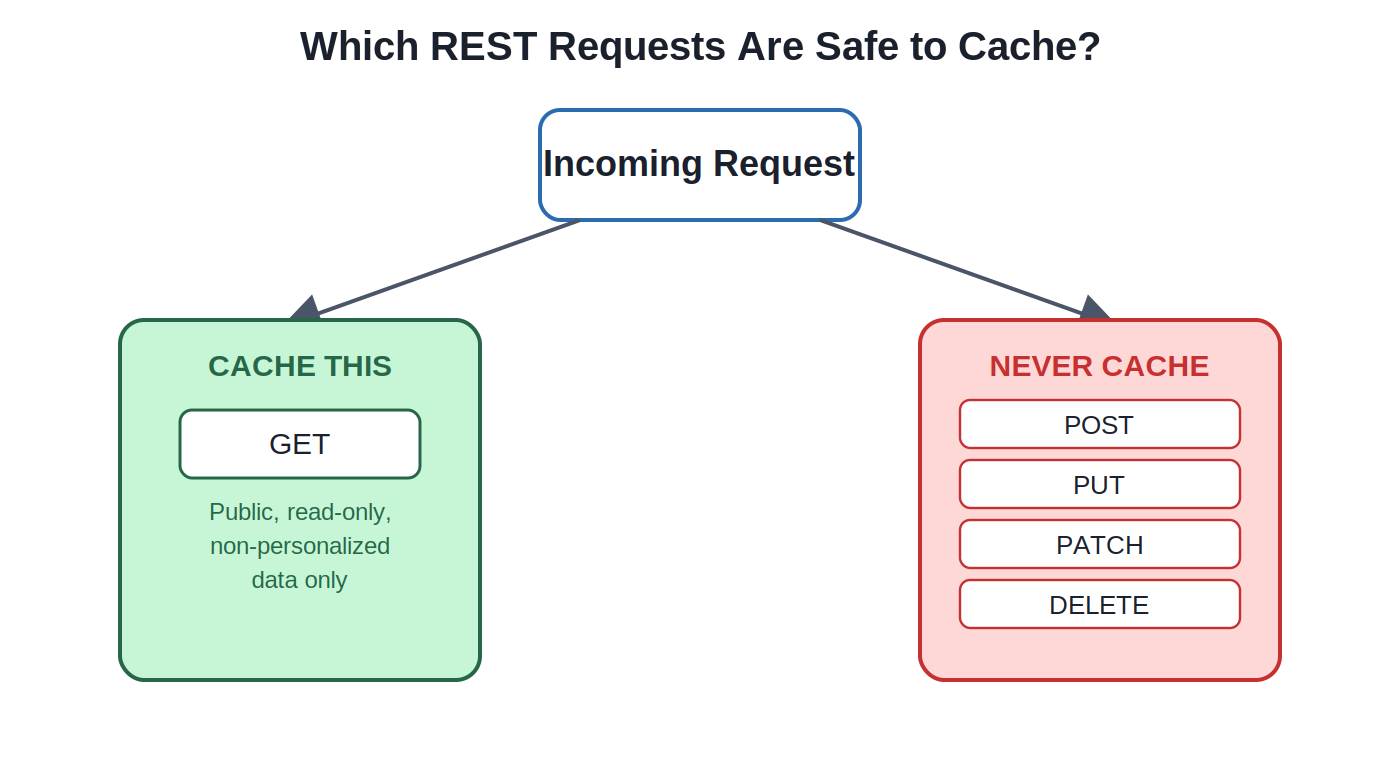
Safe to cache
- GET requests to public, non-personalized data (posts, pages, taxonomies, public product listings)
Never cache
- POST — creates data (form submissions, new orders)
- PUT / PATCH — updates existing data
- DELETE — removes data
Caching a POST or DELETE response, even accidentally, can cause a user to see stale confirmation data or, worse, cause a cached response to be replayed instead of the action actually executing. Always scope your caching logic to GET requests explicitly.
Optimize API responses beyond caching
Caching handles repeat requests well, but the first (uncached) request still needs to be fast, and payload size still matters even when cached. This is where broader WordPress API optimization comes in — trimming what you send, not just how often you fetch it fresh.
- Use _fields — request only the fields you need: /wp-json/wp/v2/posts?_fields=id,title,excerpt
- Pagination — always paginate with per_page and page rather than pulling entire collections.
- Avoid unnecessary _embed — embedding author, featured media, and terms in every request multiplies query count significantly.
- Optimize SQL queries — add indexes on frequently filtered meta keys, avoid meta_query where a custom table would be faster.
- Reduce payload size — strip HTML, avoid returning full post content when an excerpt will do.
- Custom endpoints — build purpose-specific endpoints via register_rest_route() instead of over-fetching from generic ones.
- Lazy loading — on the frontend, only request data the user is actually about to see, not the entire dataset up front.
Performance benchmark: Before vs. after
| Metric | Before optimization | After caching + Payload reduction |
| TTFB | 1,240 ms | 85ms |
| Full response time | 1,890 ms | 140 ms |
| Query count | 34 queries | 2 queries (cache hit) |
| Payload size | 210 KB | 42 KB (_fields applied) |
| Memory usage | 38 MB | 11 MB |
Note: these figures are illustrative averages from typical mid-size WordPress sites and will vary based on hosting, plugin count, and dataset size — always benchmark your own environment.
Example: Caching a custom REST endpoint
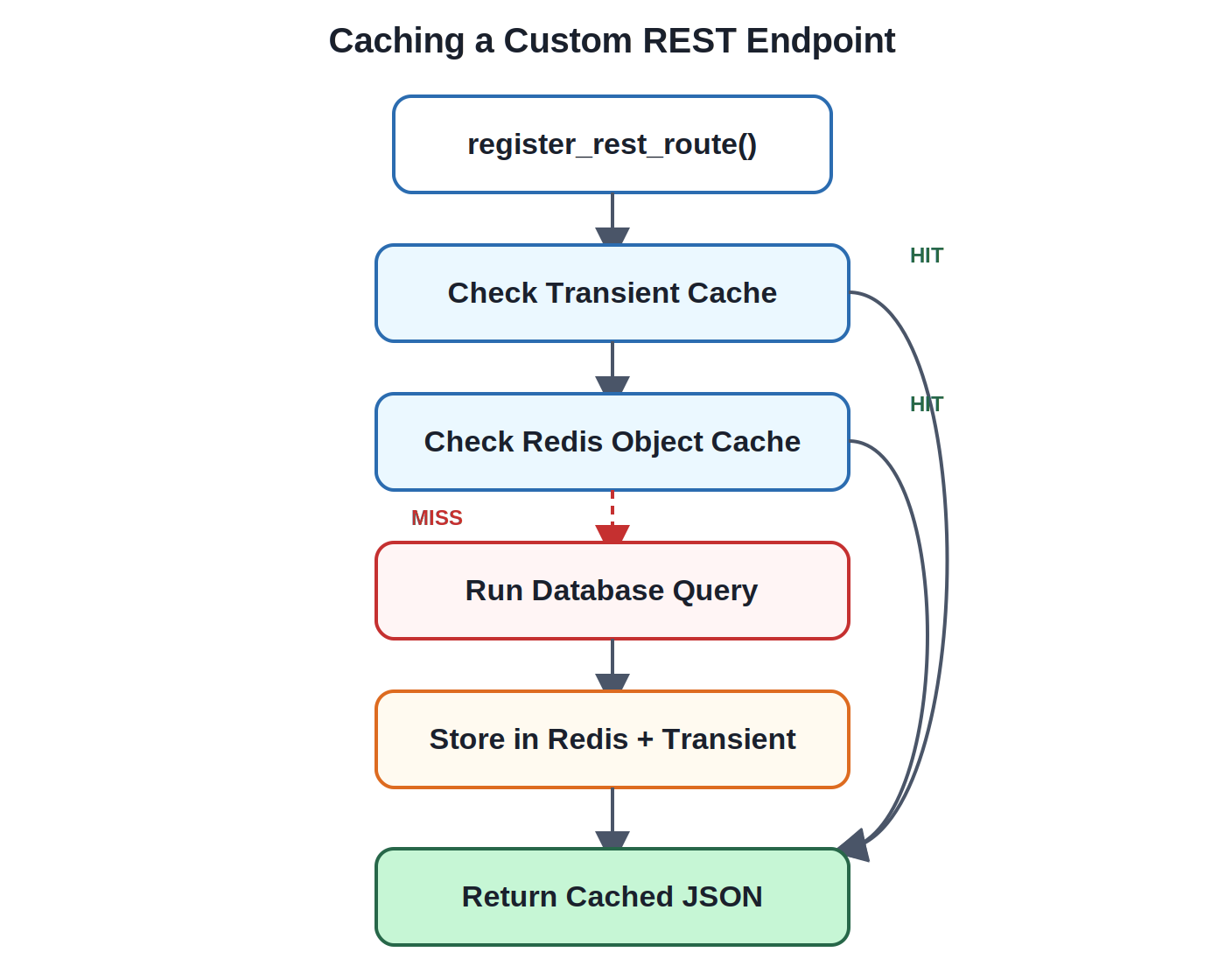
Here’s the full flow for building a custom endpoint with a layered cache — transient first, falling back to Redis, falling back to a fresh query:
add_action( 'rest_api_init', function () {
    register_rest_route( 'custom/v1', '/featured-posts', [
        'methods'  => 'GET',
        'callback' => 'get_featured_posts_cached',
        'permission_callback' => '__return_true',
    ] );
} );

function get_featured_posts_cached( WP_REST_Request $request ) {
    $cache_key = 'featured_posts_v1';

    // Try object cache (Redis) first
    $data = wp_cache_get( $cache_key, 'custom_api' );

    if ( false === $data ) {
        $query = new WP_Query( [
            'post_type'      => 'post',
'posts_per_page' => 10,
            'meta_key'       => 'featured',
            'meta_value'     => '1',
        ] );

        $data = array_map( function ( $post ) {
            return [
                'id'    => $post->ID,
                'title' => get_the_title( $post ),
                'link'  => get_permalink( $post ),
            ];
        }, $query->posts );

        // Cache for 15 minutes
        wp_cache_set( $cache_key, $data, 'custom_api', 15 * MINUTE_IN_SECONDS );
    }

    return rest_ensure_response( $data );
}
This pattern — check cache, query only on a miss, write back to cache — is the foundation of nearly every effective WordPress REST API caching implementation, whether you’re building a simple content endpoint or something more complex like a custom form handler.
Common mistakes
Even experienced developers run into these pitfalls when implementing caching:
- Caching logged-in users — serving some cached response that was originally meant for an anonymous visitor to a logged-in user (or the other way round) can cause data to slip, like personalized stuff, or it can show outdated permissions.
- Caching dynamic endpoints — things like cart totals, user-specific dashboards, or real-time inventory should not be cached , at least not unless you use careful short TTLs and also scope the cache key properly .
- Not invalidating cache — publishing a new post and having the API keep returning the old list because the cache was never cleared on save_post.
- Huge JSON responses — Huge JSON responses — caching a bloated payload still means you are shipping a bloated payload; caching does not magically solve payload size.
- No cache headers — server-side caching without matching Cache-Control headers means browsers and CDNs end up re-requesting things more than they should.
- Ignoring authentication — caching a response that included an auth-specific piece (like a nonce) can break later requests, especially for other users .
Performance testing checklist
A quick, printable checklist to confirm your caching setup is actually working:
- Object cache enabled (Redis or Memcached)
- Persistent object cache confirmed active (not just default non-persistent)
- Redis connection verified and hit rate monitored
- CDN/edge caching configured for public GET endpoints
- Cache-Control and ETag headers present on responses
- Database queries reduced/indexed for common endpoints
- Payload optimized with _fields and pagination
- Benchmarked before and after with Query Monitor + DevTools
Conclusion
Slow REST API responses aren’t usually a single cause, it’s more like the total of a bunch of small things that stack up—unoptimized queries, payloads that are a bit too large and an outright missing caching layer.
Out of all the items mentioned here , WordPress REST API caching should be your first attempt: it gives the biggest, most immediate performance boost while also keeping the implementation risk low. This can mean adding transients to a custom endpoint, hooking up Redis as a persistent object cache, or simply letting a CDN take care of public GET requests up at the edge.
After caching is actually working, then do the follow-up cleanup. Think about payload reduction (_fields, pagination, trimmed responses), and then database optimization (indexes, fewer joins, less “extra” work happening behind the scenes). And if you’re operating at real scale, yes, move into infrastructure, like a reverse proxy or a dedicated edge layer.
If you do it in that sequence, most WordPress installs can shift from multi second REST API delays to responses that feel instantly responsive. If you want the quickest improvement path for WordPress REST API speed, start with caching, everything else is just a smaller multiplier on top of that.
Also, if your project uses a decoupled frontend, this matters even more—check our headless WordPress development guide for patterns that fit that setup.
If you prefer a team to handle caching, database tuning, and infrastructure work end to end, our WordPress development services cover that exact kind of performance engineering.

