




Introduction
-
Every company has the same handful of process questions bouncing around Slack and Zoho Cliq every week: How many leaves do I have left? What’s the process for a client demo? Which form do I need for PF? We built an internal SOP chatbot to answer these directly from our SOP documents, instead of employees digging through folders or pinging a team lead who’s answered the same question ten times already.
-
It worked, but not reliably enough. The chatbot already had solid foundations: documents were chunked, converted into searchable vectors, and searched using both meaning-based and keyword-based methods, combined with a well-known fusion technique called RRF. The gap wasn’t the underlying search machinery, it was everything around it: knowing which document a question was even about, and having no fallback when that first guess was wrong.
-
This blog walks through exactly what was breaking, what we added to fix it, and how each piece actually helped.
The problem: How things used to work
The original pipeline looked like this:
-
A question comes in.
-
It’s converted into a vector (a numeric representation of its meaning) and searched against all SOP documents at once using semantic search.
-
Results are combined using Reciprocal Rank Fusion (RRF) — a method that merges a meaning-based search and a keyword-based search into one ranked list, by rewarding documents that rank well in both searches, not just one.
-
The best-matching document is picked, and an answer is generated from it.
RRF itself was already doing a good job as it’s a proven way to combine two different search signals fairly. The real gap sat one level above it: there was no reliable way to first narrow down which documents were even worth searching, and no second attempt when the first search came up thin.
What actually went wrong
A few real examples made the pattern obvious once we started testing seriously:
-
Three different “Scrum” SOPs existed — one for the dev team, one for the PM team, one for CRM/leads. A simple question like “when does scrum start” could land on any of them, or the wrong one, since all three talk about “scrum” in similar language.
-
Multiple near-identical HR forms existed — Form 2, Form 11, Form F with almost the same procedural wording (“fill the form, submit to HR, HR verifies it”). A vague question about “the PF form” could pull up the wrong one.
-
A topic-tagging mismatch actively excluded the right document. When a question mentioned “PMRS” (our internal performance monitoring system), the tagging step confidently matched it to the wrong topic “Daily PM Tasks” instead of the document that actually covered it. This isn’t a case of the content not existing: every SOP is already chunked and embedded, so the right paragraphs were sitting in the search index the whole time. The problem was upstream, a step that decides which documents to search pointed the whole search in the wrong direction before RRF or anything else ever got a chance to look at the right content.
None of this meant the AI was “bad,” and it wasn’t a search-quality problem either. It meant the system had no way of knowing which topics were related to each other, and no way to recover once an early guess sent it down the wrong path.
What we changed in our SOP chatbot
We added three specific things, starting with ontology-based search, each aimed at one of the problems above.
What it is: A small, structured layer sitting above the documents, effectively the backbone of the AI knowledge base, made of four connected pieces:
-
Entity — a specific topic, like “Form 2” or “Lead Scrum.” This is the main tag attached to each document.
-
Parent Concept — a group of closely related entities. “Scrum,” “PM Scrum,” and “Lead Scrum” all sit under one shared Parent Concept, instead of being treated as three unrelated topics. Same for the different HR forms, and for everything related to probation and employee confirmation.
-
Synonym — the different real-world words people actually use for a topic (e.g. “PF form” for Form 2), so a question doesn’t need to use the exact internal document name to be understood.
-
Intent — what kind of answer a question wants (a step-by-step process, a policy statement, a checklist, a definition), separate from what topic it’s about.
Why it helped: If a question’s topic guess lands on one entity, the system now automatically also checks its close relatives under the same Parent Concept instead of stopping at the first guess. So even if “PMRS” gets mis-tagged, the system has a structural reason to widen the search to nearby, related topics rather than confidently committing to one wrong document.
Concrete result: A question like “how long is my probation” now reliably reaches the “Employment Confirmation” document, because Probation, PMRS, and Employment Confirmation are grouped under the same Parent Concept. The system checks the whole group, not just a single exact tag.
2. Try Cheap First, Only Escalate When Needed
What it is: Every question first goes through a fast, low-cost check: does a simple keyword match find the right topic, and does a single search find a good answer? If yes, we’re done.
Only if that fails, no good match, or the answer comes back weak, do we escalate to a more expensive step: asking the AI to think harder about the question, generate a few different phrasings of it, and search more broadly using all of them.
Why it helped: Most questions are actually straightforward and don’t need the expensive path. Escalating only when needed means:
-
Most questions get answered faster.
-
Most questions cost less to process.
-
The harder, more oddly-phrased questions still get the extra effort they need.
We’re not trading accuracy for speed, we’re only paying the higher cost when the cheap attempt genuinely comes up short.
3. Smarter, Safer Caching
What it is: If two different employees ask basically the same question, even if worded differently, we now recognize that and reuse the same answer, instead of generating it twice from scratch.
The catch: not everyone can see every document. So before reusing a cached answer, we always double-check, in real time, that the specific person asking is actually allowed to see the document that answer came from. If not, we don’t reuse it, we generate a fresh, correctly-scoped answer instead.
Why it helped: This cuts down repeated work for common questions, without ever risking that someone sees information they shouldn’t.
Before vs. after
| Before | After | |
| Choosing which documents to search | One topic guess, no fallback if it was slightly off or wrong | Topic guess widened automatically to closely related topics (Entity → Parent Concept) |
| Handling hard questions | No fallback — first attempt was final | Escalates automatically to a deeper search when the first attempt is weak |
| Repeated questions | Answered from scratch every time (or cached only per exact wording) | Reused across different phrasings, safely |
| Ambiguous SOPs (e.g. three “Scrum” docs) | Picked one, sometimes wrong | Recognizes the ambiguity and handles it properly |
How flow works
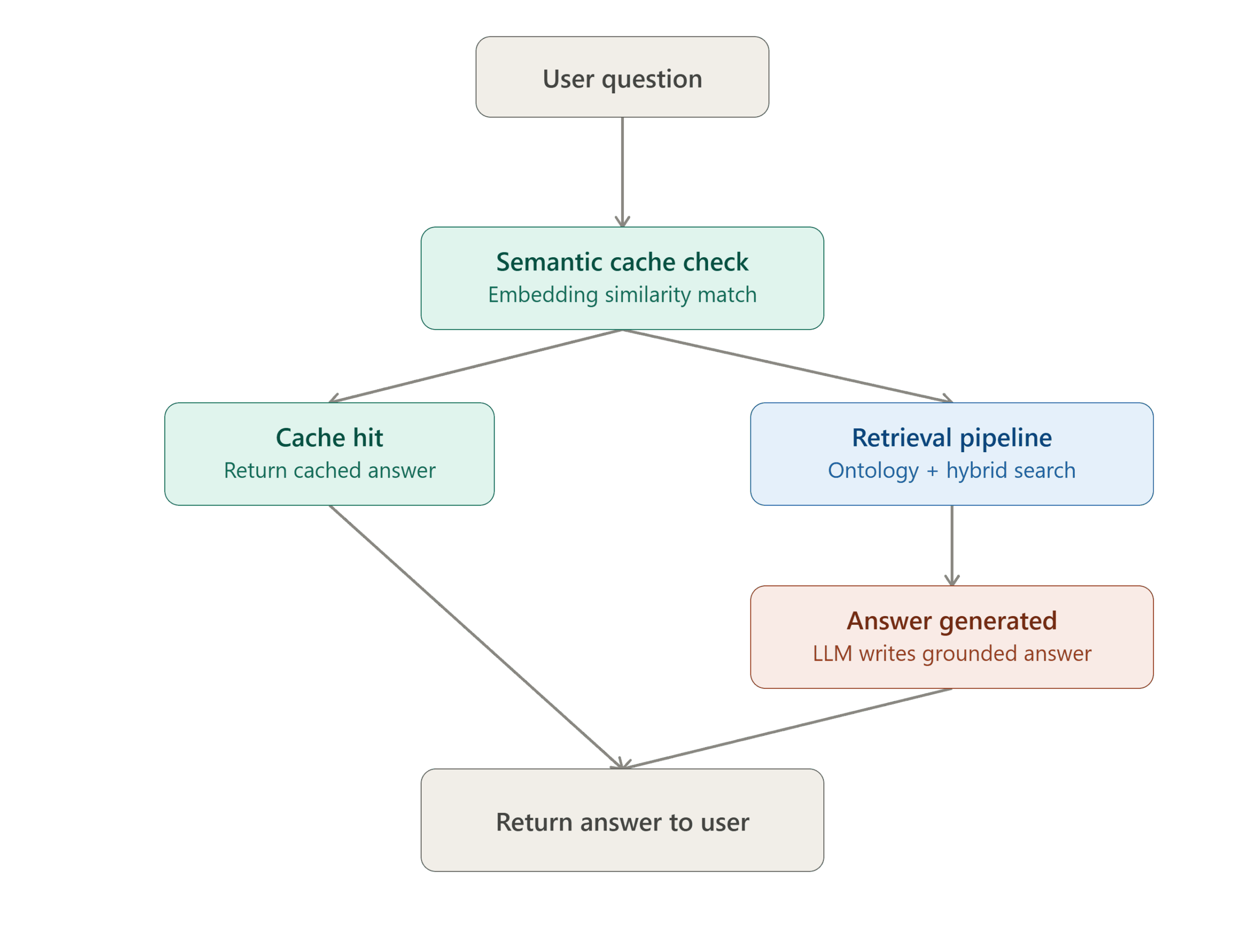
High-level flow: A user’s question first checks a semantic cache. On a cache hit, the stored answer is returned immediately with no further processing. On a miss, the question goes through the retrieval pipeline, which generates a grounded
answer, and both paths converge to return the final answer to the user.
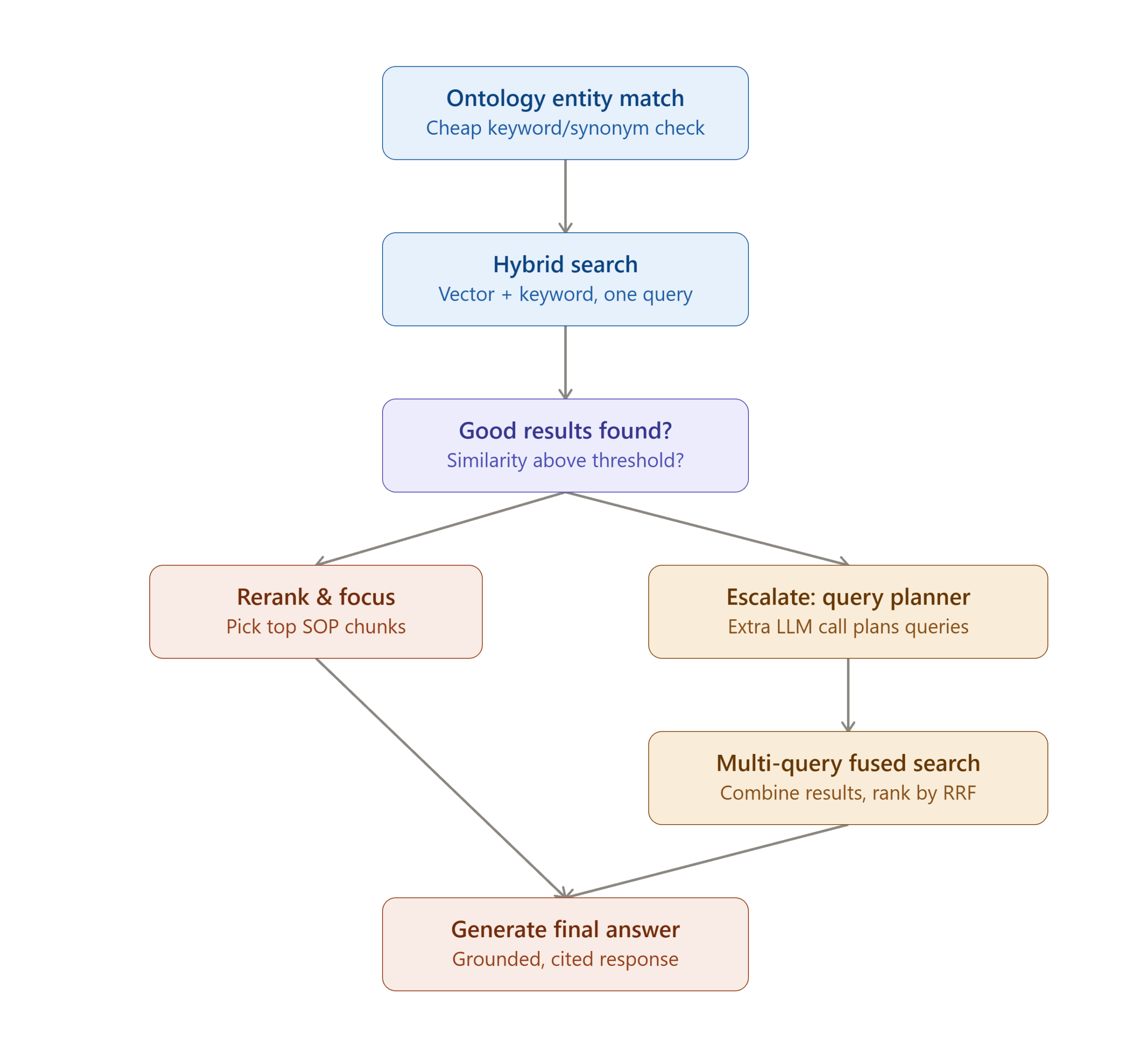
Retrieval pipeline detail: The retrieval pipeline first tries a cheap ontology-based entity match paired with a single hybrid search query. If the results are strong enough, they’re reranked and used directly. If not, the system escalates to one additional LLM call that plans multiple reworded search queries, runs a fused multi-query search across all of them, and both paths converge on final answer generation.
Most frequently asked question in FAQ
-
-
It’s an internal tool that answers questions directly from a company’s SOP documents instead of employees digging through folders or asking a team lead. It works by chunking documents, converting them into searchable vectors, and retrieving the most relevant content before generating an answer.
-
-
-
It combines meaning-based (semantic) search with keyword-based search, so a document only ranks high if it’s actually relevant from both angles and not just lucky on one.
-
-
-
It’s a structured layer above the documents that groups related topics together, Entity, Parent Concept, Synonyms, and Intent, so if the first topic guess is slightly off, the system checks closely related topics instead of committing to one wrong document.
-
-
-
Semantic search matches by meaning (so “PF form” can find “Form 2” even without word overlap), while keyword search matches literal terms. Each catches what the other misses, which is why combining them works better than using either alone.
-
-
-
RRF merges the ranked results from semantic and keyword search into one list, rewarding documents that rank well in both rather than just one. It’s a fair way to combine two signals without either dominating.
-
-
-
Usually it’s not a search-quality problem but it’s upstream. If the step that decides which documents to search mis-tags the topic, the right content never gets a chance to surface, even if it’s sitting in the index the whole time.
-
-
-
If two people ask the same question differently worded, semantic caching reuses the existing answer instead of generating it from scratch but only after confirming, in real time, that the person asking is actually allowed to see that document
-
What we learned
-
For any RAG chatbot, the AI’s answer is only as good as what it’s given to work with. Most of the real improvements here came from fixing retrieval, what gets found and handed to the AI, not from changing which AI model we used.
-
A single search attempt will always occasionally miss. Building a deliberate “try cheap, escalate if needed” fallback turned out to matter more than trying to make one search method perfect.
-
Small, targeted fixes beat a full rebuild. Every change here was in direct response to a specific, observed failure in our SOP chatbot and not a guess at what might be nice to have.

