




Modern websites are expected to feel fast, responsive, and seamless. Yet traditional multi-page navigation can still create a noticeable interruption: clicking a link unloads the current document, the browser requests a new page, and the interface is rebuilt from scratch. The transition is also challenging to navigate, even with quick server responses.
There are solutions to enhance this experience like using Barba.js and GSAP page transitions. Barba.js will take care of the navigation and replacement of the page contents, and GSAP will take care of the in/out animation. They can be used together to achieve something similar to a SPA-like page transition, but maintain a traditional multi-page website structure.
The key, however, is not just in making a page transition impressive. Other features that need to be taken into account for a production-ready implementation are reduced-motion preferences, mobile devices, and JavaScript failures along with browser history, SEO, focus management, and keyboard navigation.
Here, we’ll create a simple Barba.js and GSAP transition, and then examine the performance and accessibility implications of going into production.
1.What Are Barba.js and GSAP Page Transitions?
Barba.js and GSAP address two different aspect of the whole page transition issue.
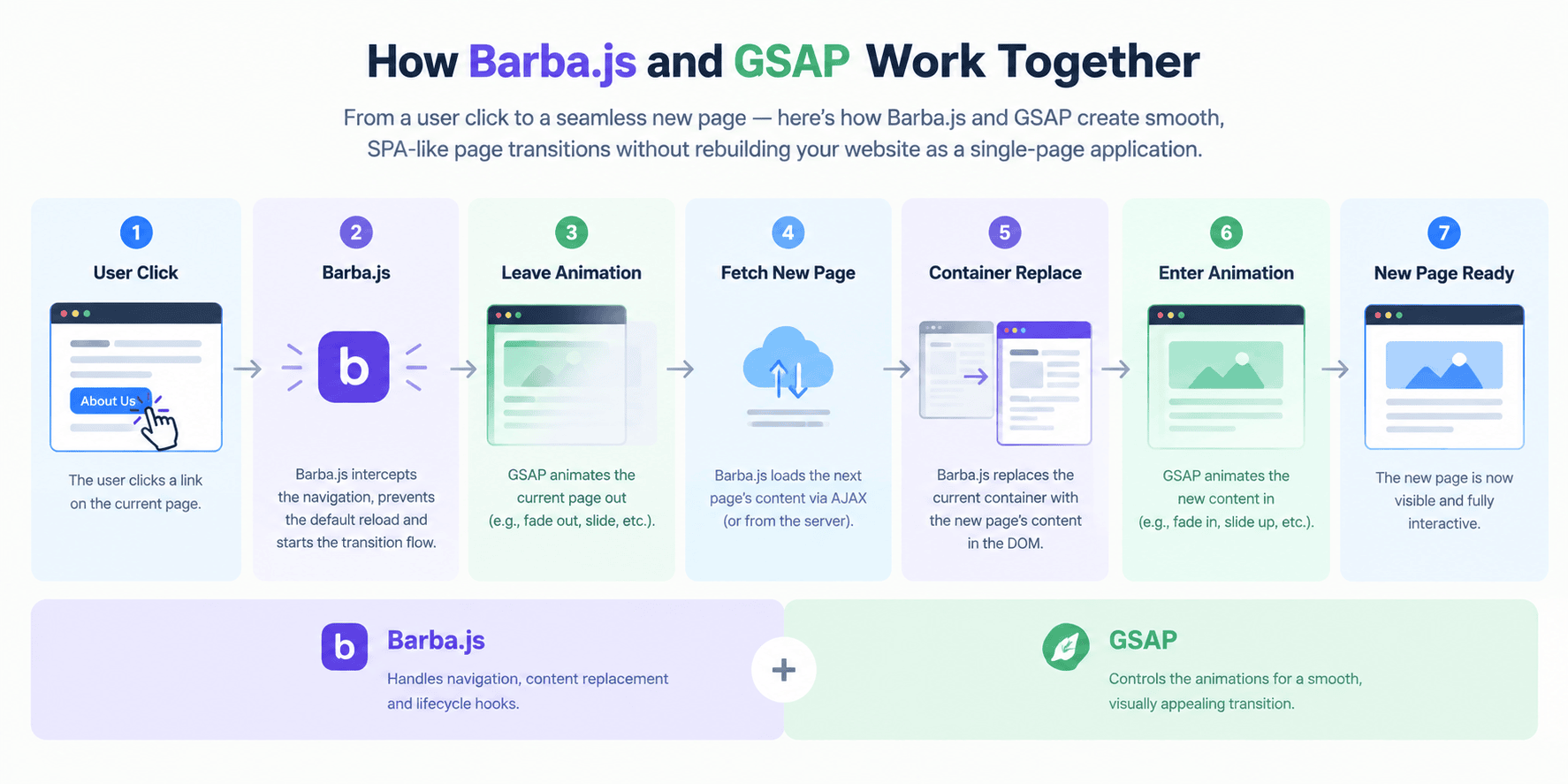
Barba.js is used for handling page navigation. It can capture matching links, load the next page, upload the desired content and offer lifecycle hooks for executing transition logic.
The visual part is done by GreenSock Animation Platform (GSAP). It offers developer exactness over properties like opacity, x, y, scale, and other animation properties. The relationship can be understood by analogizing to: When a page changes, it’s controlled by Barba.js, what it changes, is controlled by GSAP.
Traditional navigation:
Click Link → Request Document → Current Page Unloads → New Page Loads → New Page Renders
With Barba.js:
Click Link → Barba.js Intercepts → Leave Animation → Fetch Content → Replace Container → Enter Animation → New Page Ready
This creates the impression of continuous navigation while the website can still use separate server-rendered pages.
What GSAP Does
Once Barba.js determines when a transition should happen, GSAP can control the animation itself.
For example, an outgoing page could fade out:
gsap.to(current.container, {

  opacity: 0,

  duration: 0.4

});

The incoming page could then fade in:

gsap.from(next.container, {

  opacity: 0,

  duration: 0.4


});
For more complex experiences, GSAP timelines can sequence multiple elements:
Overlay appears → Current content moves out → New content enters → Heading appears → Navigation becomes interactive
2.SPA-Like Without Building a Full SPA
The one thing pro that this approach has is that you don’t always need to create an existing website into a SPA (React, Vue) application to make navigation smoother.
It’s possible to incorporate enhanced navigation behavior to a traditional multi-page website, without changing its architecture.
For a more in-depth discussion of the difference in architecture, check out our article about single-page and multi-page applications.
Traditional Navigation vs Barba.js + GSAP
| Aspect | Traditional Navigation | Barba.js + GSAP |
| Navigation | Full document reload | Content transition |
| Page architecture | Multi-page | Can remain multi-page |
| Animation control | Limited | Highly customizable |
| Navigation feel | Abrupt | Smoother |
| SPA-like experience | No | Yes |
| Implementation complexity | Low | Medium |
| Accessibility responsibility | Standard browser behavior | Requires additional consideration |
The important distinction is that Barba.js does not magically make an MPA a true SPA. It provides enhanced navigation behavior that can feel similar to an SPA.
3.How Barba.js and GSAP Work Together
To build reliable transitions, it helps to understand how Barba.js organizes page content.
Barba.js Wrapper and Container
A minimal structure can look like this:
<body>

  <div data-barba="wrapper">

    <main data-barba="container" data-barba-namespace="home">

      <h1>Home Page</h1>

      <a href="/about.html">About</a>

    </main>

  </div>


</body>
The two important concepts are:
-
Wrapper: The outer element that contains the transition area.
-
Container: The page-specific content that Barba.js replaces during navigation.
A namespace can identify which page is currently being displayed.
For example:
<main
data-barba=”container”
data-barba-namespace=”about”>
This becomes particularly useful when different pages need different transition behavior.
Understanding Transition Hooks
Three important Barba.js hooks are:
| Hook | When It Runs | Typical Use |
| once | Initial page load | Intro animation |
| leave | Current page exits | Fade/slide current content |
| enter | New page enters | Reveal new content |
Initial load:
Page Load → once() → Intro Animation
Navigation:
Click Link → Barba.js → leave() → New Content → enter()
Leave

leave(data) {

  return gsap.to(data.current.container, {

    opacity: 0,

    duration: 0.4

  });

}

Enter

enter(data) {

  return gsap.from(data.next.container, {

    opacity: 0,

    duration: 0.4

  });

}
4.How to Create Smooth Page Transitions with Barba.js and GSAP
Let’s create a basic fade transition
This isn’t about creating a fancy visual effect, just yet. On the contrary, we would like to have a small implementation that really shows the Barba.js life cycle .
1. Install Barba.js and GSAP
In case of a package-based project:
npm install @barba/core gsap
Then import them:
import barba from ‘@barba/core’;
import { gsap } from ‘gsap’;
The libraries may also be included via the relevant browser builds (for a simple HTML project).
2. Add the Barba.js HTML Structure
There should be a shared wrapper and a replaceable container on the page
<body>
  <div data-barba="wrapper">
    <main data-barba="container"  data-barba-namespace="home">
      <h1>Home Page</h1>
      <a href="/about.html">
        Go to About
      </a>
    </main>
  </div>
</body>

The format of the destination page should be the same as that of the source page.


For example:
<body>
  <div data-barba="wrapper">
    <main data-barba="container" data-barba-namespace="about">
      <h1>About Page</h1>
      <a href="/index.html">Back to Home</a>
    </main>
  </div>
</body>
3. Initialize Barba.js

We can now get Barba.js working with GSAP:

import barba from '@barba/core';

import { gsap } from 'gsap';

barba.init({

  transitions: [

    {

      name: 'fade',

      leave(data) {

        return gsap.to(data.current.container, {

          opacity: 0,

          duration: 0.4,

          ease: 'power2.out'

        });

},

      enter(data) {

        return gsap.from(data.next.container, {

          opacity: 0,

          duration: 0.4,

          ease: 'power2.out'

        });

      }

    }

  ]

});

Important here is that the GSAP animation returns a Promise-like animation object that Barba.js can await before moving on with the transition life cycle.

4. Set the Initial State Explicitly

Use gsap.set() to set up an initial state for more controlled transitions:

enter(data) {

  gsap.set(data.next.container, {

    opacity: 0

  });

  return gsap.to(data.next.container, {

    opacity: 1,

    duration: 0.4,

    ease: 'power2.out'

  });

}

This is helpful since the target page will be in the desired initial condition prior to the animation. It also prevents the usual 'glitch' whereby an element is briefly on screen in its final state before GSAP animates it.


5. Using an Overlay Transition

Using a full-screen overlay can give a more professional look.

HTML:

<div class="page-transition"></div>

<div data-barba="wrapper">

  <main data-barba="container">

    <!-- Content -->

  </main>

</div>

CSS:

.page-transition {

  position: fixed;

  inset: 0;

  pointer-events: none;

  transform: scaleX(0);

  transform-origin: left;

}

GSAP can then control the overlay:

leave(data) {

  const timeline = gsap.timeline();

  timeline.to('.page-transition', {

    scaleX: 1,

    duration: 0.5,

    ease: 'power2.inOut'

  });

  return timeline;

},

enter(data) {

  const timeline = gsap.timeline();

  timeline.to('.page-transition', {

    scaleX: 0,

    duration: 0.5,

    ease: 'power2.inOut'

  });

  return timeline;

}

This provides you with a foundation to build more advanced transitions.
5.Optimizing Barba.js and GSAP Page Transitions for Real-World Performance
A transition can look smooth while still being expensive. Good implementation should minimize unnecessary JavaScript, layout recalculation, DOM manipulation, and navigation delays.
Animate Transform and Opacity
Prefer performant properties such as transform and opacity:
gsap.to(element, {

  x: 100,

  opacity: 0,

  duration: 0.5

});

Instead of frequently animating layout-heavy properties:

gsap.to(element, {

  left: 100,

  width: 500,

  marginLeft: 50

});
Properties such as width and position are not forbidden, but should be used deliberately.
Keep Transitions Short
A transition should support navigation, not delay it. For most websites, short animations around the navigation experience are more usable than elaborate multi-second effects.
The user should notice continuity, not wait for the animation.
Use gsap.set() for Immediate State Changes
gsap.set(element, {
opacity: 0,
y: 20
});
gsap.to(element, {
opacity: 1,
y: 0,
duration: 0.5
});
This keeps the initial state deterministic.
Avoid Animating Everything
Animating every heading, image, card, button, and paragraph can make the interface noisy and unnecessarily expensive.
A simple page transition combined with one meaningful content animation is often more effective.
Old Page → Transition → New Page → Primary Content
Clean Up Timelines and Event Listeners
Barba.js replaces page containers, so JavaScript associated with the previous DOM can become stale.
Without cleanup, navigation may create multiple:
-
GSAP timelines
-
Event listeners
-
ScrollTrigger instances
-
Observers
Use a clear initialization and cleanup strategy:
let pageTimeline;
function initPage() {
pageTimeline = gsap.timeline();
}
function cleanupPage() {
pageTimeline?.kill();
}
Page-specific ScrollTrigger instances should also be cleaned up when their DOM is removed.
Don’t Make Animation a Loading Barrier
Large images, third-party scripts, fonts, or analytics should not unnecessarily block the transition.
Think of the transition as a separate UX layer:
Navigation → Transition / Content Request / Page Initialization
The goal is to avoid making animation itself feel like a loading screen.
6.Making Barba.js Transitions Accessible
Navigation should be made easier with animation, but never be difficult for keyboard users, screen-reader users, or people who want less animation.
Respect prefers-reduced-motion
CSS:
@media (prefers-reduced-motion: reduce) {
.page-transition {
transition: none;
}
}
You can also modify GSAP using JavaScript:
const reduceMotion = window.matchMedia(
‘(prefers-reduced-motion: reduce)’
).matches;
const duration = reduceMotion ? 0 : 0.4;
gsap.to(element, {
opacity: 0,
duration
});
It is not always necessary to remove the entire feedback. Small movement-based animations or content replacement might be better than large movement changes.
Manage Keyboard Focus
As Barba.js does not fully reloading the entire document, it might be necessary to manage focus explicitly.
function setPageFocus(container) {
container.setAttribute(‘tabindex’, ‘-1’);
container.focus();
}
If the structure of the site lends itself to it, the main content heading or container can be a logical place for the destination focus.
Keep Navigation Keyboard Accessible
Use normal links:
<a href=”/about.html”>About</a>
Instead of elements that can only be clicked, use:
<div onclick=”navigateToAbout()”>About</div>
Barba.js isn’t intended to replace normal navigation.
Avoid putting users in a “trap”.
Avoid:
-
Excessively long transitions
-
Infinite animations
-
Interaction-blocking overlays
-
Animations that prevent keyboard access
-
Transitions that continue after content is usable
Accessible Web Animations Need More Than Reduced Motion
Also consider:
-
Keyboard navigation
-
Focus management
-
Visible focus indicators
-
Semantic HTML
-
Readable content and contrast
-
Screen-reader announcements where appropriate
-
JavaScript failure behavior
For more information, see our guide to web accessibility best practices.
7.SEO and Browser Navigation Considerations
Smooth transitions should not compromise discoverability or normal navigation.
Update the Page Title
When content changes without a full reload, update the document title:
document.title = nextPageTitle;
Page-specific metadata should also be handled according to the project’s implementation.
Keep URLs Correct
Correct URLs are important for:
-
Bookmarking
-
Sharing
-
Browser history
-
Analytics
-
User expectations
Test Back and Forward
Test more than simple link clicks:
Home → About → Services → Back → Forward
Browser history can reveal issues that normal navigation does not.
Preserve Normal Page Accessibility
Use progressive enhancement. Real links should continue to work if JavaScript fails:
<a href=”/services.html”>Services</a>
Barba.js should enhance navigation, not make content dependent on JavaScript.
8.Common Barba.js and GSAP Implementation Mistakes
1. Page Scripts Stop Working
When Barba.js replaces a container, old event listeners do not automatically transfer.
Instead of:
document
.querySelector(‘.menu-button’)
.addEventListener(‘click’, openMenu);
use page-specific initialization:
function initPage(container) {
const menuButton = container.querySelector(‘.menu-button’);
if (!menuButton) return;
menuButton.addEventListener(‘click’, openMenu);
}
Initialize the new page after navigation.
2. Duplicate Event Listeners
Running initialization after every transition without cleanup can cause one action to trigger multiple times.
Think:
Initialize → Use → Cleanup → Initialize Again
not:
Initialize → Initialize → Initialize
3. Flashing Before Animation Starts
gsap.from() can sometimes allow an element to briefly render in its final state.
Use an explicit initial state:
gsap.set(element, {
opacity: 0
});
gsap.to(element, {
opacity: 1,
duration: 0.4
});
4. Animating Layout-Heavy Properties
Prefer transform and opacity for common movement and visibility transitions.
5. Forgetting Mobile Devices
Test:
-
Touch navigation
-
Smaller screens
-
Slow networks
-
Reduced-motion settings
-
Low-powered devices
-
Portrait and landscape orientation
6. Ignoring Reduced Motion
Always consider the user’s prefers-reduced-motion preference.
7. Breaking Browser History
Test Back and Forward independently rather than assuming normal links cover every case.
8. Using One Transition Everywhere
Different pages may need different animation intensity. Namespaces can distinguish page types:
data-barba-namespace=”portfolio”
and:
data-barba-namespace=”documentation”
A visual portfolio transition may be appropriate, while documentation pages may benefit from an almost instant transition.
9.Production Checklist
Before deploying Barba.js and GSAP transitions, run through this checklist.
Performance
-
Animate transform and opacity where appropriate
-
Keep transition durations short
-
Avoid unnecessary animations
-
Test on lower-powered devices
-
Inspect performance using browser DevTools
-
Clean up unused GSAP timelines and animation instances
Accessibility
-
Respect prefers-reduced-motion
-
Maintain keyboard navigation
-
Manage focus after navigation
-
Preserve visible focus indicators
-
Avoid interaction-blocking animations
-
Keep semantic HTML
Mobile Responsiveness
-
Test touch navigation
-
Test smaller screens
-
Check animation intensity on mobile
-
Test portrait and landscape layouts
-
Test slower network conditions
Browser Navigation
-
Test normal links
-
Test Back
-
Test Forward
-
Test page refresh
-
Test direct URLs
-
Test external links
Script Cleanup
-
Reinitialize page-specific scripts
-
Remove duplicate event listeners
-
Kill obsolete GSAP timelines
-
Clean up ScrollTrigger instances when used
-
Avoid references to removed DOM elements
SEO
-
Update page titles
-
Preserve correct URLs
-
Verify canonical metadata
-
Check page-specific metadata
-
Test direct page access
-
Ensure content remains available without transition JavaScript
Fallback Behaviour
-
Links still work without JavaScript
-
Content isn’t hidden permanently by animation CSS
-
Navigation doesn’t depend entirely on GSAP
-
Users aren’t trapped by a failed transition
-
The website remains usable when JavaScript fails
Conclusion
Barba.js and GSAP page transitions can make traditional multi-page navigation feel smoother and more continuous without rebuilding the website as a single-page application.
Barba.js manages navigation and lifecycle hooks, while GSAP provides precise control over visual animation. The combination becomes most effective when developers also consider GSAP animation performance, initialization and cleanup, browser history, SEO metadata, keyboard focus, mobile devices, and reduced-motion preferences.
The best transition is one that creates continuity without making users wait. When motion is fast, purposeful, and accessible, Barba.js and GSAP page transitions can provide an SPA-like experience while preserving the flexibility of a traditional website.
FAQs
1. What is Barba.js used for?
Barba.js creates smooth page transitions by managing navigation, content replacement, and transition lifecycle events without the visual interruption of a traditional full-page reload.
2. How do Barba.js and GSAP work together?
Barba.js manages navigation and lifecycle hooks, while GSAP handles the animations. Together, they provide highly customizable page transitions.
3. Can Barba.js make a website work like an SPA?
It can make a traditional multi-page website feel like an SPA by replacing page content without a full document reload for compatible navigation. However, it does not automatically convert the underlying architecture into a true SPA.
4. Do Barba.js page transitions affect SEO?
They can if implemented incorrectly. Pages should remain accessible through real URLs, titles and metadata should be updated correctly, and content should remain usable without JavaScript.
5. How can I improve GSAP page-transition performance?
Use performant properties such as transform and opacity, keep transitions short, avoid unnecessary animations, and clean up timelines and page-specific animation instances. Use browser DevTools to measure the result.
6. How do I make page-transition animations accessible?
Respect prefers-reduced-motion, maintain keyboard navigation and focus management, preserve visible focus states, use semantic HTML, and avoid excessive or interaction-blocking animations.
7. Why do scripts stop working after a Barba.js transition?
Barba.js can replace the DOM container containing previously initialized elements. Their event listeners do not automatically transfer to the new DOM. Reinitialize page-specific scripts after navigation and clean up old listeners, timelines, observers, and other resources.

