




Introduction
As we are at the end of 2026, automation is everywhere, and it is just too simple to build workflows easily, but the difficult thing is where to host and how to use their own cloud or self-host. Depending on third-party infrastructure introduces several challenges as requirements grow. Offshore development companies need to consider data privacy and compliance, recurring platform costs, vendor lock-in, limited infrastructure-level customization, and dependence on an external service’s rules and regulations.
A self-hosted AI automation platform offers a viable alternative by letting organizations run their automation infrastructure under their development control. In this blog, we will use Windmill, an open-source workflow automation tool that uses scripts, workflows, APIs, and internal tools as the foundation for building an AI automation environment.
Why use Windmill and Docker for AI Automation?
- Windmill is an orchestration platform that provides teams with the ability to build automated flows using its features of scripts, flows, jobs, APIs, and schedules. Developers can write scripts in any language, such as JavaScript, TypeScript, or Python, while keeping resources, variables, and secrets managed and configured via APIs and credentials across multiple workflows. Windmill can also connect with external APIs and LLM providers, making it preferable for building AI-powered automation.
- Docker helps with providing the infrastructure layer that makes Windmill to deploy on servers and manage them. Standard Docker images and standardised containerization offer a consistent runtime environment, eliminate dependencies, and offer easier deployments across testing, development, and production environments. Deployment systems based on Docker also allow you to upgrade libraries, roll back if something goes wrong after a version update, and move data between environments through migration.
- Together, Windmill and Docker provide a practical foundation for building and operating AI workflows. For teams managing multiple containerized automation workloads, our guide on workloads and our guide on managing Docker-based workflows in production cover additional production practices.
Windmill with Docker vs hosted automation platforms
| Factor | Windmill with Docker | Hosted automation platform |
| Infrastructure control | Full control for developers | Managed by provider |
| Data location | Your own infrastructure | Provider infrastructure |
| Customization | High – When needed | Platform-dependent |
| Deployment | Self-managed | Managed |
| Scaling | Infrastructure-controlled | Provider-controlled |
| Vendor lock-in | Lower | Potentially higher |
| Maintenance | Your responsibility | Provider responsibility |
| AI integrations | Customizable | Depends on platform; customizable |
Architecture of the Windmill AI Automation platform
The architecture of Windmill AI automation is as follows :
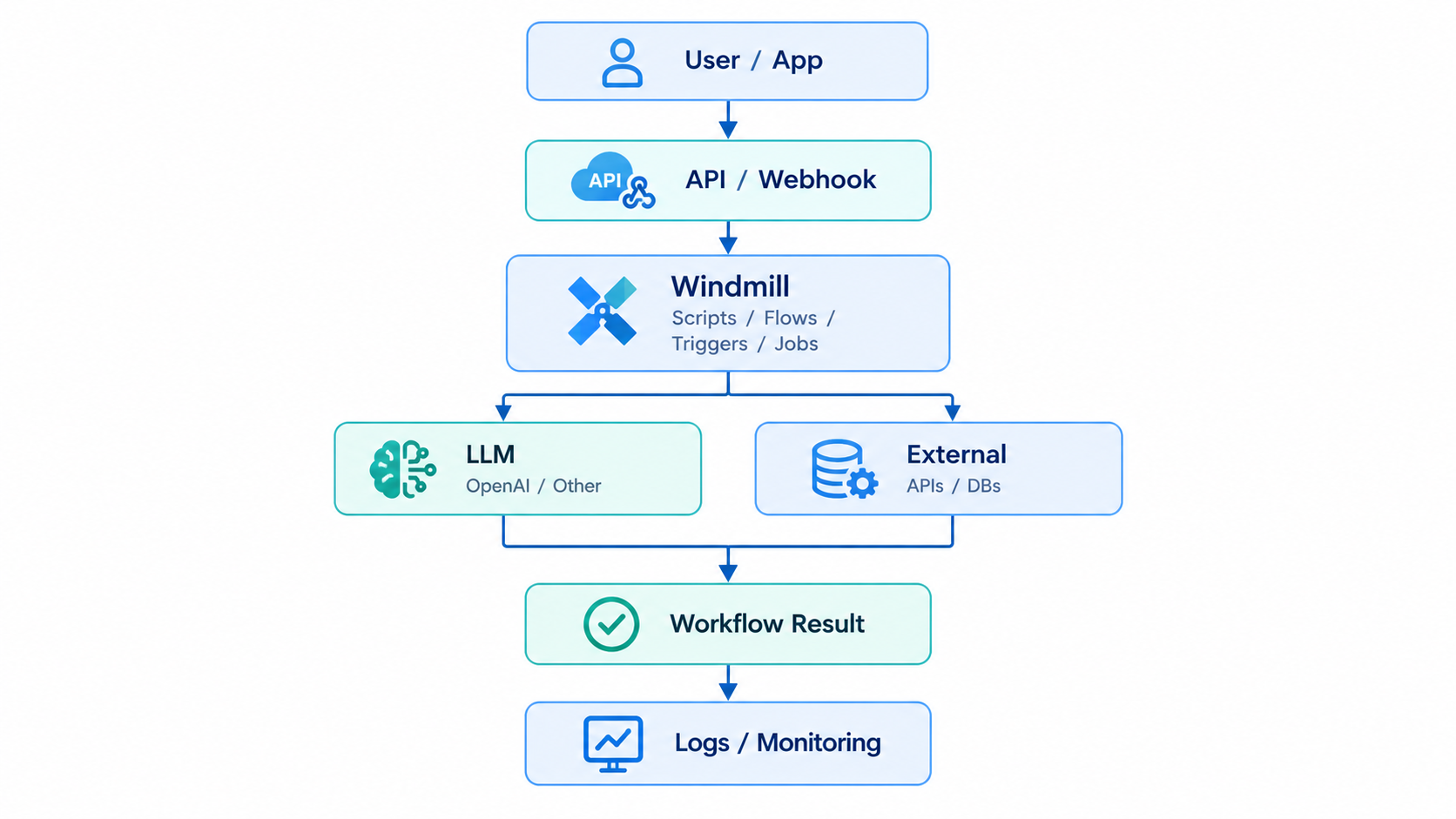
Now understand each element of it.
1. User / application
Users or automatic application system triggers an automation workflow by sending a request through an API, triggering with a webhook, or scheduling at a particular time.
2. API / Webhook
APIs and webhooks are the entry point for external requests and events, allowing applications and third-party services to trigger Windmill workflows automatically.
3. Windmill
At the core of the Windmill platform, Windmill orchestrates the developer-created scripts, flows, triggers, and jobs. It manages the execution of different workflow steps mentioned in the flow.
4. LLM Integration
Windmill can connect with large language models and act as an open-source AI automation platform. This enables workflows to perform AI-related tasks such as summarization of text, sentiment analysis of client tickets, and decision support.
5. External APIs and databases
Windmill provides robust support to communicate with other external APIs and databases to retrieve, process, and transform the data as per need.
6. Workflow result
After the AI and external integrations complete their tasks, Windmill produces the workflow result. This can be processed data, an API response, an automated action, or another business output.
7. Logs and monitoring
The logs and monitoring in the windmill helps the developers to track and debug errors and also help monitor the performance of Windmill workflows.
Prerequisites for the Windmill Docker setup
Below are the prerequisites required for the Windmill Docker setup :
Knowledge requirements
Basic understanding of Docker and Linux commands
- Intermediate-level knowledge of any core programming language, such as Python/JavaScript
- Understanding of API concepts and how CRUD works
AI requirements
Depending on the requirements of flows and scripts:
- OpenAI API key
- Other LLM API credentials
- Optional local/cloud models that best suit your requirements
Hardware requirements
- CPU
- RAM
- Disk
- Network
- Linux server
Software requirements
- Docker
- Docker Compose
- Git
- SSH access
- If you are planning to publish the self-hosted Windmill with Docker publicly, it needs a domain name.
How to build a self-hosted AI Automation platform with Windmill
- Building a self-hosted Windmill starts with deploying it through Docker container services.
- Below are the steps to install and run Windmill through Docker:
Step 1: Create the project in the deployment infrastructure location
mkdir windmill
cd windmill
Step 2: Start Docker Compose file where project docker compose.yml file is located
docker compose up -d
Step 3: Check the containers are running
docker compose ps
The above steps provide an environment for Docker AI automation and make it easier to manage configuration across development and production.
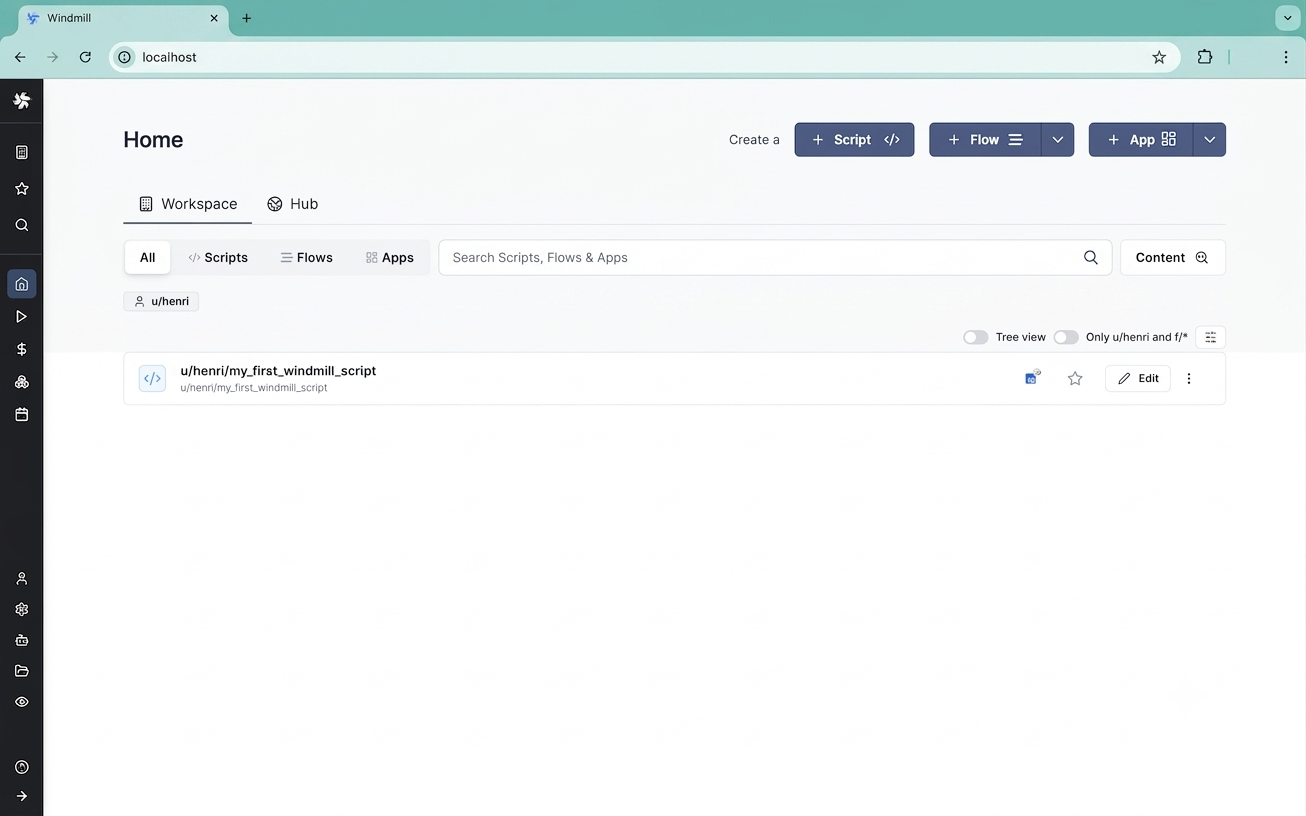
After setting go to the browser and login; now you will see the Windmill dashboard like below :
- Set the scripts and flows as you want
- Below is the flow we created for our HR department :
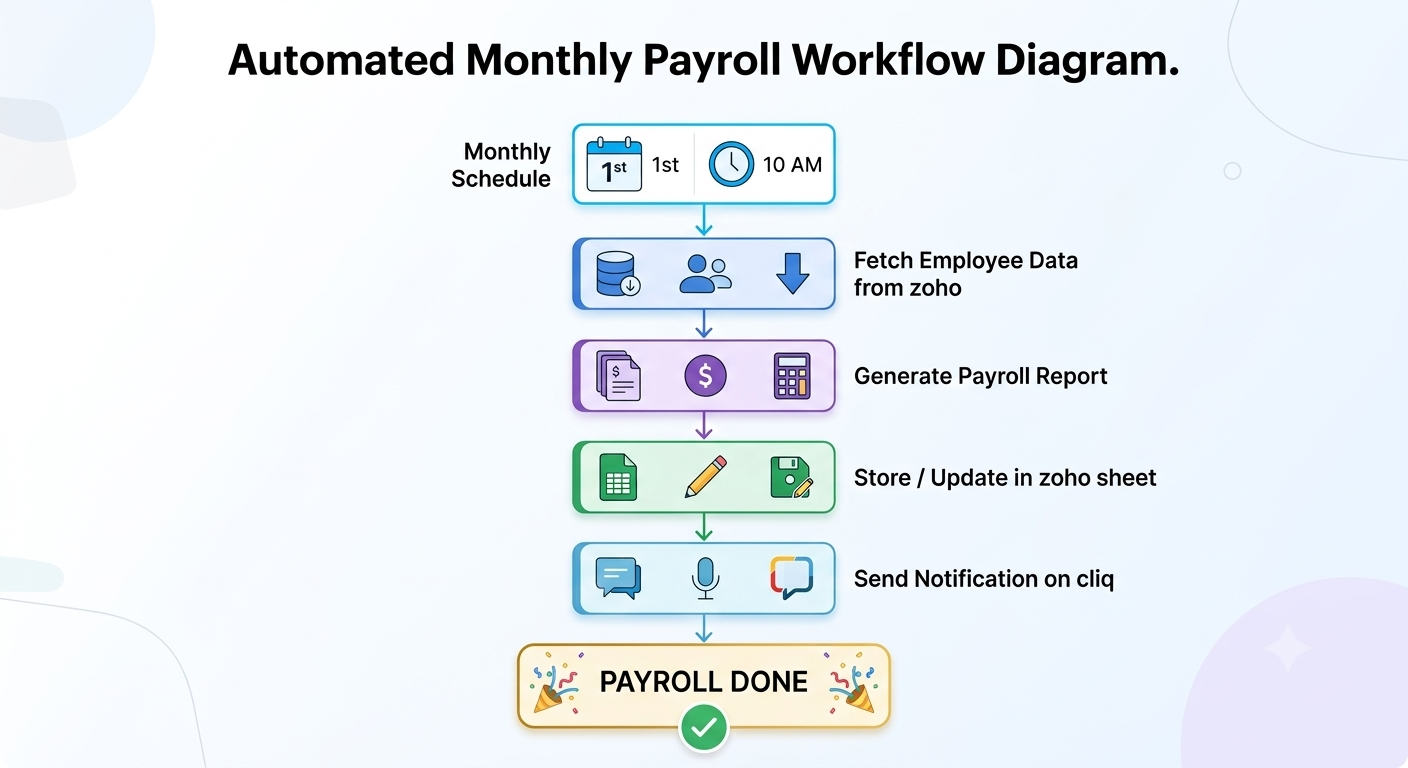
- Monthly, HR calculates the hours of payroll for all associates manually from zoho remove the lunch and break hours, and sends the final calculations to the finance department.
- With this, on the 1st of every month at 10 AM, HR has last month’s payroll data; they just need to verify it and can directly send it to the finance department. According to the HR team, it is saving them 2-3 hours.
- Above is one example; developers can build AI workflows with Windmill in numerous way following are other examples:
- Automatic trigger email when a client message arrives and post in Slack / Teams / Zoho Cliq as per requirement to notify team members
- Sentiment analysis of client message to identify priority
- HR needs to check excel everyday if any associates have a birthday or not; this can be automated and also send AI generate message according to a prompt.
- Data transformation tasks can be easily done for raw data.
Security, monitoring, and production best practices
- When we talk about AI automation platforms, security and monitoring should be considered from the beginning while deploying Windmill workflow automation in a production environment.
- Windmill provides variables as secret so keep our API keys, database connection credentials, and LLM API keys stored separately instead of hard-coding them in scripts.
- Use authentication and HTTPS for network control to prevent any cyber attack on the Windmill instance.
- By adding database backups and recovery methods to minimize the risk of data loss.
- Continuously monitor the Docker container health, CPU usage, workflow executions, and Windmill flow logs to identify issues, if any.
- Set resource limits to prevent excessive deployment infrastructure costs.
- Windmill provides roles, so set permissions on role based so users only access what they need, not all the workflows the organization handles.
Common windmill and Docker setup problems
When developers deploy Windmill using Docker Compose, you may face challenges with configuration and infrastructure issues that affect workflow execution.
Below are the common problems listed :
- Docker Container failures: sometimes mistakes like incorrect environment variables, insufficient memory on the server, or service configuration errors can prevent containers from starting or cause execution to stop unexpectedly.
- Port conflicts: As it might be possible that other services also run on the same server, so the required port of Windmill is already in use, preventing Windmill supporting services from starting.
- Database connectivity: Incorrect database credentials, mistakes in database URLs or hostnames, authentication settings, or network settings of Docker cause connection failures.
- Resource exhaustion: Running multiple workflows or AI jobs simultaneously consumes significant CPU and memory resources and can reach the resource limit and stop the workflows.
- Configuration errors: Missing or incorrectly valued variables in Windmill cause unexpected application behaviour or the API not running.
When should you use Windmill for AI Automation?
- If your organization wants complete control of the infrastructure, data-driven automation platform, and AI workflows, then Windmill is a good choice for you. Development teams find it convenient to quickly plug LLMs into other internal apps, third-party APIs, any database, or other business systems.
- Windmill is a go-to choice if you want to run crons of schdeduled jobs, webhook triggers, and any API automation through data processing and multi-step AI workflows. organization that has developers with Python, TypeScript, or other programming languages can use scripts and flows to build customized automation.
- For developers with specific security, compliance, infrastructure, or any random requirements, deploying Windmill with Docker provides additional control over the runtime environment and monitoring logs.
Most frequently asked question in FAQ
A self-hosted AI automation platform is one where all of the development team’s work is done on their own infrastructure, and you have complete control over the workflows, scripts, data, and integrations.
Yes. Windmill can be run with Docker and Docker Compose to make installation and environment management easier.
Securely set LLM API credentials in resources and call the provider from Windmill scripts or workflows.
Both offer workflow automation and AI integrations, but if you need more custom coding, then Windmill is a good alternative to n8n.
Basic programming skills are useful, especially to write custom Python or TypeScript scripts.
When it’s done right with authentication, HTTPS, secrets management, network controls, permissions, monitoring, and regular updates, then it is.
Yes. Production deployments should have the right resources, monitoring, backups, security controls, and failure handling.
Conclusion
- The creation of a self-hosted Windmill-based AI automation platform gives organizations complete control over their processes and infrastructure. In this blog, we discuss what is the need of windmill, architecture of it and requirements before starting. Additionally, we also examined the common mistakes to avoid with security and how the tool is useful for implementing API and scheduled automation, as well as webhook trigger scripts.
- At August Infotech, as an offshore development company, we are creating the production ready AI automation as per business needs and help the organization to reduce their manual work by automating it.

